> ## Documentation Index
> Fetch the complete documentation index at: https://docs.browspark.krishm.dev/llms.txt
> Use this file to discover all available pages before exploring further.
# How it works
> The three pieces, how they talk, and what happens on a single tool call.
## The pieces
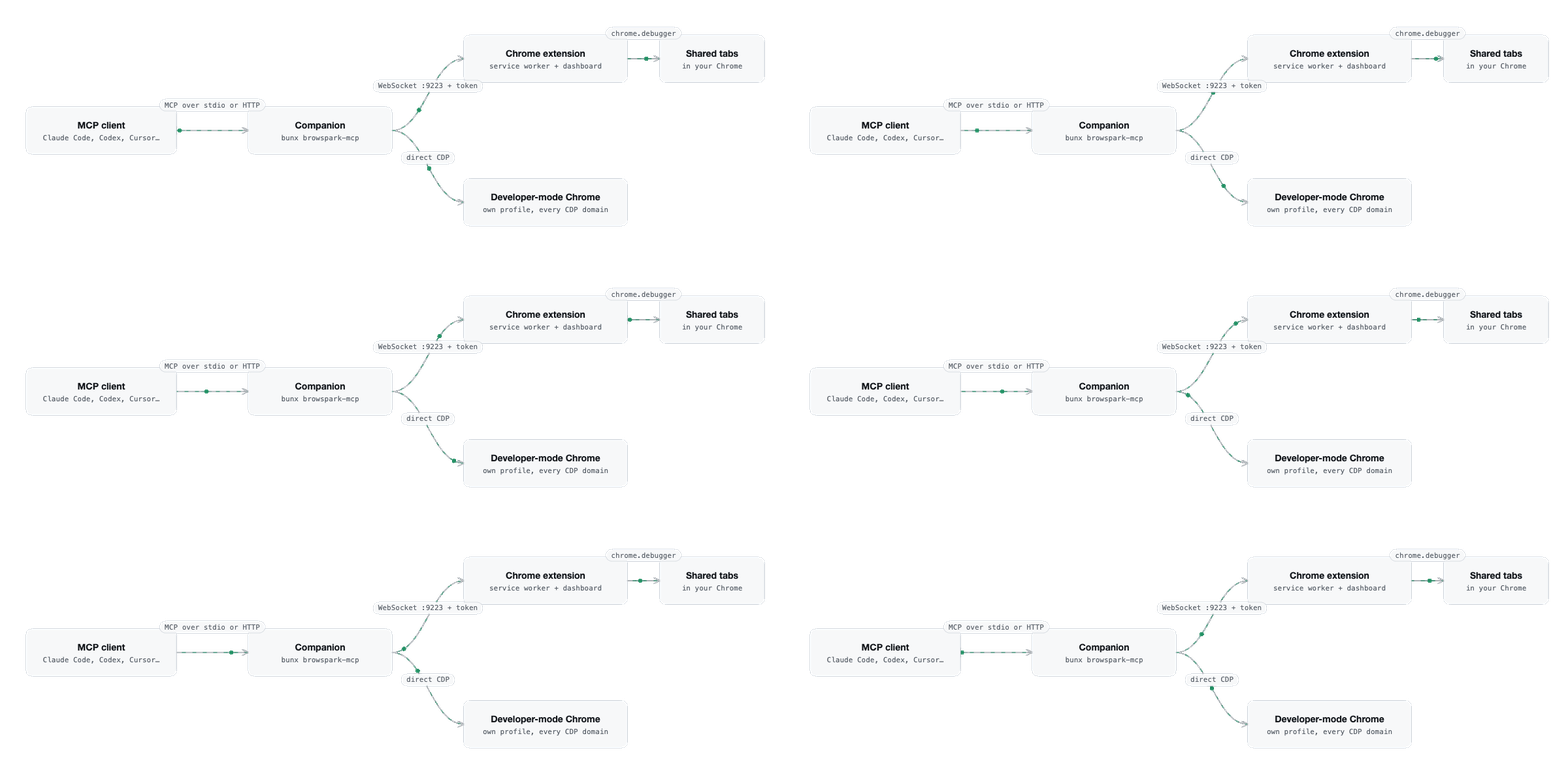
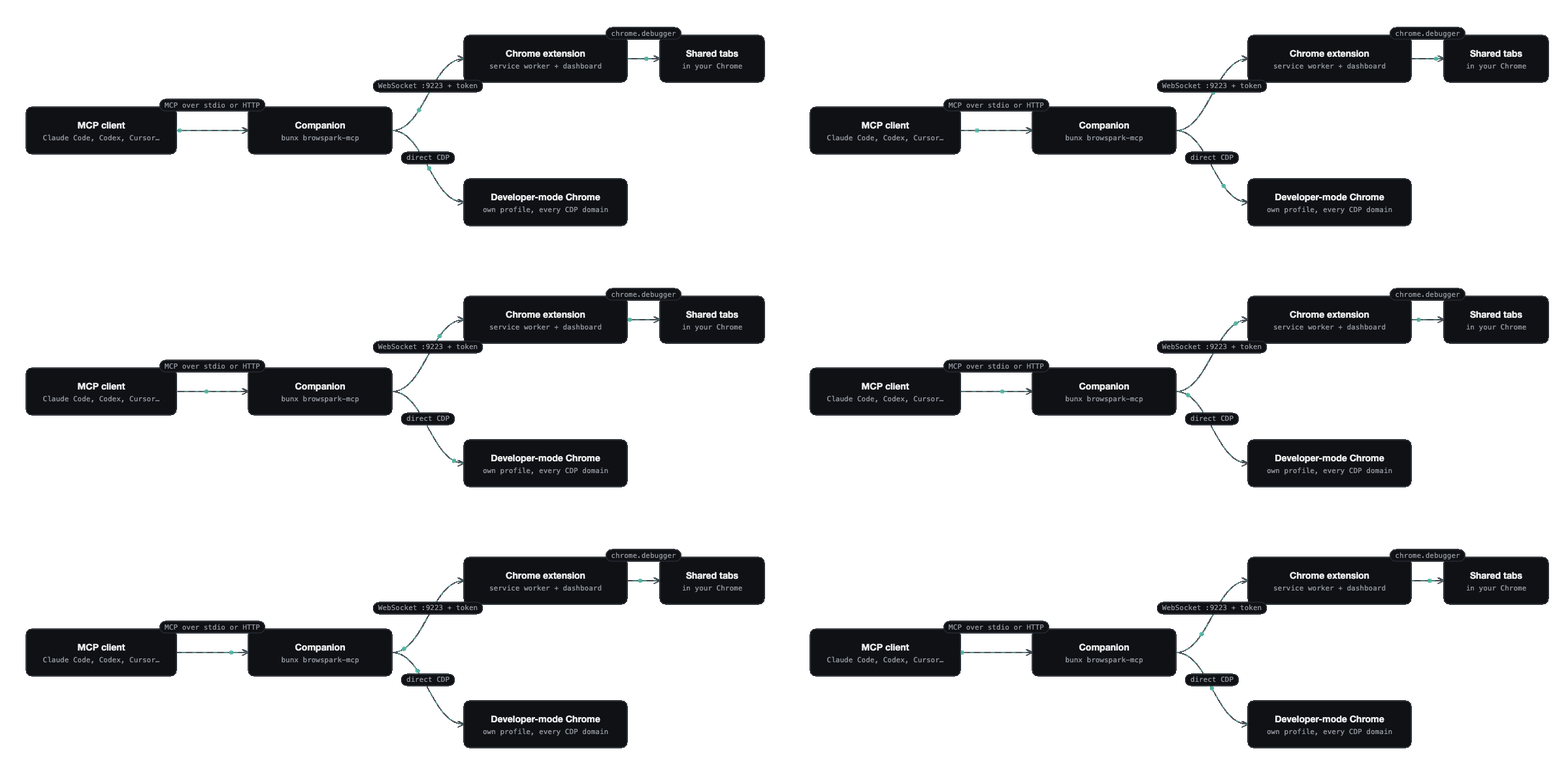 * **Companion** (`companion/`): the MCP server. Registers 43 tools, keeps per-tab capture state (console, network, scripts, paused frames, issues), holds artifacts, and routes each command to either the extension or a developer browser.
* **Extension** (`extension/`): a Manifest V3 service worker that owns the WebSocket to the companion and attaches Chrome's debugger to shared tabs, plus the full-page dashboard where you share tabs, switch tools on and off, and read the activity log.
* **Shared protocol** (`shared/protocol.ts`): the typed request, response and event messages between the two. Summarised in [Wire protocol](/reference/wire-protocol).
## One tool call, end to end
1. The agent calls `browser_click {tabId: 1234, ref: "e12"}`.
2. The companion checks the tool is not [disabled in the dashboard](/concepts/tool-policy), resolves the tab (the caller's own tab, the only usable tab, or the explicit `tabId`) and looks up ref `e12` in the snapshot registry the page keeps in `window.__bmcp`.
3. Because tab 1234 is an extension-mode tab, the companion sends a `cdp` request over the WebSocket: method `Input.dispatchMouseEvent` with the coordinates.
4. The service worker attaches the debugger if it is not attached yet, activates the tab inside its window (background tabs drop input events), forwards the command, and returns the result.
5. While waiting, the companion also listens for `Page.javascriptDialogOpening` and `Debugger.paused`. If a dialog or breakpoint interrupts the click, the call returns immediately and says what to do next instead of hanging.
6. After 30 seconds without commands the worker detaches the debugger and the yellow bar disappears, unless a `devtools_session` is holding the tab.
## Developer mode
When a tool needs something Chrome does not expose to extensions, for example a heap snapshot, it fails with a message saying so. `browser_session {action: "launch"}` then starts a separate Chrome with `--remote-debugging-port=0`, reads its `DevToolsActivePort` file, and talks to it directly. Those tabs are always usable, DevTools opens on each one by default, and every domain is available. The dashboard's **Developer browser** setting controls whether launches are allowed. Details in [Developer browser](/concepts/developer-browser).
## State and files
Everything persistent lives under `~/.browspark/`:
| Path | Contents |
| ------------------------------ | ----------------------------------------------------------------------------- |
| `token` | Pairing token. |
| `tools.json` | Tools disabled from the dashboard, applied on every companion start. |
| `profile/`, `profiles//` | Persistent Chrome profiles of developer contexts. |
| `downloads//` | Downloads made in developer contexts. |
| `artifacts/` | Traces, CPU and heap profiles, HAR, PDFs, Lighthouse reports, recorder flows. |
See [Files and directories](/reference/files-and-directories).
* **Companion** (`companion/`): the MCP server. Registers 43 tools, keeps per-tab capture state (console, network, scripts, paused frames, issues), holds artifacts, and routes each command to either the extension or a developer browser.
* **Extension** (`extension/`): a Manifest V3 service worker that owns the WebSocket to the companion and attaches Chrome's debugger to shared tabs, plus the full-page dashboard where you share tabs, switch tools on and off, and read the activity log.
* **Shared protocol** (`shared/protocol.ts`): the typed request, response and event messages between the two. Summarised in [Wire protocol](/reference/wire-protocol).
## One tool call, end to end
1. The agent calls `browser_click {tabId: 1234, ref: "e12"}`.
2. The companion checks the tool is not [disabled in the dashboard](/concepts/tool-policy), resolves the tab (the caller's own tab, the only usable tab, or the explicit `tabId`) and looks up ref `e12` in the snapshot registry the page keeps in `window.__bmcp`.
3. Because tab 1234 is an extension-mode tab, the companion sends a `cdp` request over the WebSocket: method `Input.dispatchMouseEvent` with the coordinates.
4. The service worker attaches the debugger if it is not attached yet, activates the tab inside its window (background tabs drop input events), forwards the command, and returns the result.
5. While waiting, the companion also listens for `Page.javascriptDialogOpening` and `Debugger.paused`. If a dialog or breakpoint interrupts the click, the call returns immediately and says what to do next instead of hanging.
6. After 30 seconds without commands the worker detaches the debugger and the yellow bar disappears, unless a `devtools_session` is holding the tab.
## Developer mode
When a tool needs something Chrome does not expose to extensions, for example a heap snapshot, it fails with a message saying so. `browser_session {action: "launch"}` then starts a separate Chrome with `--remote-debugging-port=0`, reads its `DevToolsActivePort` file, and talks to it directly. Those tabs are always usable, DevTools opens on each one by default, and every domain is available. The dashboard's **Developer browser** setting controls whether launches are allowed. Details in [Developer browser](/concepts/developer-browser).
## State and files
Everything persistent lives under `~/.browspark/`:
| Path | Contents |
| ------------------------------ | ----------------------------------------------------------------------------- |
| `token` | Pairing token. |
| `tools.json` | Tools disabled from the dashboard, applied on every companion start. |
| `profile/`, `profiles//` | Persistent Chrome profiles of developer contexts. |
| `downloads//` | Downloads made in developer contexts. |
| `artifacts/` | Traces, CPU and heap profiles, HAR, PDFs, Lighthouse reports, recorder flows. |
See [Files and directories](/reference/files-and-directories).